Simple software for real-world problems

Useful tools.
Practical by design.

HM STUDIO builds practical software to make complex work easier. Start with our free FANUC CNC Simulator: edit G-code, inspect toolpaths and machining previews in 2D/3D, and export your work. More useful tools will follow.

Free Online Beta · Edit, preview & export · Actively improved through user feedback

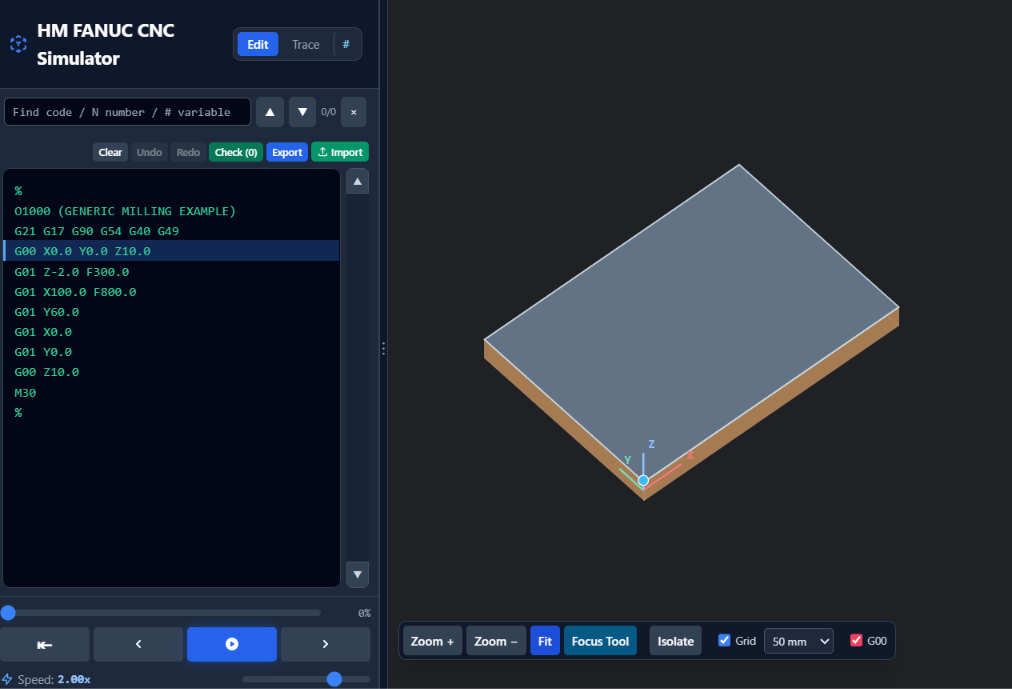
HM FANUC CNC SIMULATOR · REAL INTERFACE
Actual Stage 5 RC1 simulator interface showing an editable FANUC G-code program alongside a 3D stock preview
Featured first product

HM FANUC CNC Simulator

A practical editor and simulator in one: work with FANUC-style G-code, visualize results, and export programs. We will keep improving it based on real-world use and feedback.

Free Online · Release candidate

Browser edition

Free

Edit FANUC-style G-code directly, inspect the resulting toolpaths and machining previews, and export your work—all in the browser.

  • 2D/3D visualization
  • Macro B and subprogram inspection
  • Live code-to-path inspection and playback
  • Import, edit and export G-code files
Launch Free Simulator
Planned · Not available yet

Windows offline edition

CAD $10 / one-time, planned

A planned Windows edition using the same simulator core, for programmers who prefer working without an internet connection.

  • Windows desktop installation
  • Offline workflows
  • One-time purchase concept
  • No subscription planned
Learn about the plan
What we're building

Inspect the code. See the motion.

⌘

G-code understanding

Inspect modal commands, coordinates, arcs, loops and subprogram execution within documented Beta limits.

⌗

Toolpath visualization

Study moves in 2D and inspect depth and stock-removal previews in 3D.

≡

Code-to-path inspection

Connect program lines with visual movement, playback and variable inspection.

Tools for different tasks

Explore by category

A growing collection of focused software. The FANUC Simulator is our first featured tool; other products are planned, not yet available here.

⌗

CNC Tools

Inspect programs, explore toolpaths and visualize machining. Starting with the FANUC CNC Simulator.

Explore FANUC Simulator →
⌕

Productivity Tools

Practical helpers for finding information and getting work done. FileDex content search is a future possibility.

More tools planned
∑

Utilities

Simple, useful everyday tools, including calculators and other focused utilities as the collection grows.

More tools planned
Improve with us

Tell us what you need

Report a bug, request an operating system, suggest a feature, or tell us about another practical tool you need.

Share feedback
Continuously improving

Track new releases

We release improvements based on testing and user feedback. See new versions, fixes and known limitations as the simulator develops.

Release notes